
PowerEdge R630 Server/Lab: Difference between revisions
No edit summary |
No edit summary |
||
| Line 29: | Line 29: | ||
All of this is still pretty early-stage, but it’s functional. Every VM I spin up is another tool I can play with, tweak, or break on purpose. The goal is to build a self-reliant environment that doesn’t depend on third-party services — something I can iterate on and use as a base for bigger ideas (including automation, CNC control, AI inference, and more). | All of this is still pretty early-stage, but it’s functional. Every VM I spin up is another tool I can play with, tweak, or break on purpose. The goal is to build a self-reliant environment that doesn’t depend on third-party services — something I can iterate on and use as a base for bigger ideas (including automation, CNC control, AI inference, and more). | ||
== What Is Ventoy (and Why It’s a Game-Changer for USB Boot Drives)== | |||
[[File:PoweredgeSeverLab2.jpg|600px|thumb|center|Cool!]] | |||
If you’ve ever flashed a USB stick the old-school way, you know the pain. Traditionally, making a bootable USB meant using tools like Rufus, BalenaEtcher, or dd to overwrite the entire drive with an ISO image. Once that happened, the USB was basically locked into being a single-purpose boot device — no extra storage, no flexibility, and you'd have to re-flash it every time you wanted a different OS. | |||
Ventoy flips that whole process on its head. | |||
Instead of writing a single ISO image directly to the drive, Ventoy installs a small bootloader partition on the USB stick — kind of like giving it a smart brain. After that, all you do is drag and drop your .iso files (or .img, .vhd, etc.) directly onto the drive like normal file storage. That’s it. No flashing, no overwriting. | |||
When you boot from the Ventoy USB, you get a menu that shows every ISO sitting on the drive. Pick the one you want, hit enter, and it boots straight into it. Want to add another OS? Just copy the ISO over. Done. Want to remove one? Delete the file. It’s literally plug-and-play for ISOs. | |||
Even better — Ventoy lets you use the remaining space on the USB drive for normal file storage too. You can toss in ISOs and still use the stick like a portable flash drive. Need to carry a Windows installer and some drivers or config files? No problem. | |||
== Journal Pictures == | == Journal Pictures == | ||
Revision as of 04:15, 13 May 2025
| PowerEdge R630 Server/Lab | |
|---|---|

| |
| Information | |
| Owner | Fxtrip |
| Version | 1.0 |
| Status | In Progress |
| Started On | February 2025 |
| Cost | TBD |
Overview
Dell PowerEdge R630 Projects (a.k.a. The Homelab Core)
The R630 is the heart of the lab right now — a surprisingly capable little rack beast that's pulling way more weight than you'd expect from an old enterprise box. It's running Proxmox VE, which has basically become the sandbox for everything I'm messing with. From there, I've spun up a bunch of VMs to explore how far I can go with local-first infrastructure.
So far, I've got:
A Flask-based API running in its own VM — nothing wild yet, but it’s a clean interface I can use to pass data between tools or services. It’s meant to be a glue layer for automation later on.
A self-hosted wiki for documentation, project logs, and general knowledge dumping. This has already become the home for all the build notes, configs, and ideas that were previously scattered across too many devices and napkins.
Ollama, running locally — yeah, LLMs without the cloud. It's been super interesting trying out lightweight models, passing prompts via API, and just seeing how viable local AI is when it’s not backed by a datacenter. It’s not fast (yet), but it works — and I control everything.
A few networking-focused VMs to experiment with traffic routing, virtual LANs, and just understanding how stuff talks to each other behind the scenes. Eventually, I want to scale this into something that mimics small production environments — or at least doesn’t fall apart the second you throw multiple services at it.
All of this is still pretty early-stage, but it’s functional. Every VM I spin up is another tool I can play with, tweak, or break on purpose. The goal is to build a self-reliant environment that doesn’t depend on third-party services — something I can iterate on and use as a base for bigger ideas (including automation, CNC control, AI inference, and more).
What Is Ventoy (and Why It’s a Game-Changer for USB Boot Drives)

If you’ve ever flashed a USB stick the old-school way, you know the pain. Traditionally, making a bootable USB meant using tools like Rufus, BalenaEtcher, or dd to overwrite the entire drive with an ISO image. Once that happened, the USB was basically locked into being a single-purpose boot device — no extra storage, no flexibility, and you'd have to re-flash it every time you wanted a different OS.
Ventoy flips that whole process on its head.
Instead of writing a single ISO image directly to the drive, Ventoy installs a small bootloader partition on the USB stick — kind of like giving it a smart brain. After that, all you do is drag and drop your .iso files (or .img, .vhd, etc.) directly onto the drive like normal file storage. That’s it. No flashing, no overwriting.
When you boot from the Ventoy USB, you get a menu that shows every ISO sitting on the drive. Pick the one you want, hit enter, and it boots straight into it. Want to add another OS? Just copy the ISO over. Done. Want to remove one? Delete the file. It’s literally plug-and-play for ISOs.
Even better — Ventoy lets you use the remaining space on the USB drive for normal file storage too. You can toss in ISOs and still use the stick like a portable flash drive. Need to carry a Windows installer and some drivers or config files? No problem.
Journal Pictures
-
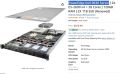 Starting with a $360 server. 2TB HD, 56 Cores and 125GB of Ram
 -
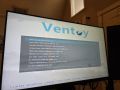 Found a Cool utility called Ventoy. Run multiple boot ISOs and have usb storage on a boot disk
 -
 Set up Proxmox
 -
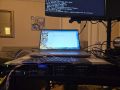 Got the server up and running and the web interface
 -
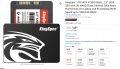 Figured out I needed to set up raid and get my drives. Redid everything
 -
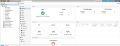 The server was delayed a month and lost in Nashville. When I powered it on the replacement had been upgraded 72 cores!
 -
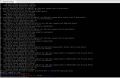 Spun up an Unbuntu Server VM headless
 -
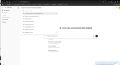 Installed Ollama, Several LLMs and got the web interface working for my locally run AI
 -
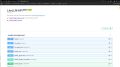 Installed a Tool to allow me to connect to chatGPT and other AIs through my local interface
 -
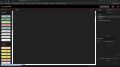 Installed Node JS, Heard about it for a while with Microcontrollers. Will be fun for the lab.
 -
 Set up an API that allows programs to ping my AI and get a response.
 -
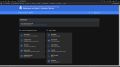 Got overwhelmed with tabs and port numbers. Made a web page with Homer.
 -
 Tested my API with excel lol Just a goal for the end of the day type thing.
 -
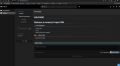 Attached a Wiki to my Server's Landing Page.


Bill of Materials
| Item | Cost | Quantity | Sub Total | Distributor |
|---|---|---|---|---|
| 1 TB Drives | 50 | 6 | 300.00 | Amazon |
| Drive Caddy 4 Packs | 24 | 2 | 348.00 | Amazon |
| Front Bezel | 34 | 1 | 382.00 | redacted |
| Server | 360 | 1 | 742.00 | Amazon |