
FxTrip's Ender 3: Difference between revisions
No edit summary |
No edit summary |
||
| Line 90: | Line 90: | ||
== Status Pictures == | == Status Pictures == | ||
<gallery> | |||
File:FxTripEnderPic1.jpg|Starting with a $170 Ender3v1 printer. (I've seen as low as $50 on craigslist). I chose this printer due to its extruded aluminum profile. | |||
File:FxTripEnderPic2.jpg|A friend let us borrow their 3D scanner, so I had a slight detour. | |||
File:FxTripEnderPic3.jpg|You could read the text on the bottom of it too! | |||
File:FxTripEnderPic4.jpg|Replacing the Bowden Extruder with a Direct Drive Sprite Pro. Direct drive allows me to print flexible filament, and the extruder gets to 300C for higher temp filaments. | |||
File:FxTripEnderPic5.jpg|Replacing the stock Ender 3 board with the BIGTREETECH SKR Mini E3 V3.0 was one of the most impactful improvements to the printer. The stock Creality board is limited by its 8-bit processor, loud stepper drivers, and minimal firmware flexibility. The SKR Mini upgrade addressed all of these issues while maintaining compatibility with the Ender 3’s wiring and form factor. | |||
File:FxTripEnderPic6.jpg|Here we are adding linear rails | |||
File:FxTripEnderPic7.jpg|Upgrading Linear Rails | |||
File:FxTripEnderPic8.jpg|Added supports for wobble | |||
File:FxTripEnderPic9.jpg|Printed a failed case. I didn't check the usb clearance and trusted google. | |||
File:FxTripEnderPic10.jpg|Are those sharks with laser beams attached to their heads? | |||
File:FxTripEnderPic11.jpg|At this point it was a wise move to get a m3,m4,m5 t-nut, kit and screw kit. Enders use these 3 types and nothing more typically. I will say there were a few times i needed a longer bolt that wasn't included in the kit. Buy 8 spares at an extended length and break them to length with your wire strippers. | |||
File:FxTripEnderPic12.jpg|Its always good to have a pinout. There were some spares here that had me worried. | |||
File:FxTripEnderPic13.jpg|The fans were odd. It came for a direct wire on the fan which I recrimped and moved to the board. | |||
File:FxTripEnderPic14.jpg|Added some covers to keep the junk out of the t slots.... and it looks cool. | |||
File:FxTripEnderPic15.jpg|Got a large enclosure. Its nice now but it will be packed in the future. | |||
File:FxTripEnderPic16.jpg|Adding Y axis rail. It was pretty annoying to find the right kit here. | |||
</gallery> | |||
Revision as of 22:51, 12 May 2025
| FxTrip's Ender 3 Print/Laser/EDM | |
|---|---|
| Information | |
| Owner | Fxtrip |
| Version | 1.0 |
| Status | In Progress |
| Started On | February 2025 |
| Cost | TBD |
Overview
My Ender 3 is a heavily modified original V1 model, upgraded for high-speed, high-quality printing with modular capabilities in mind. It’s equipped with a BIGTREETECH SKR Mini E3 V3.0 mainboard, which offers quiet TMC2209 stepper drivers and Klipper compatibility thanks to its 32-bit architecture. I’ve replaced the stock extruder with a Sprite Pro direct-drive system, enabling better control over flexible filaments and high-temperature materials. The printer is controlled via a Raspberry Pi 4 running Klipper, Moonraker, Mainsail (for the web interface), and KlipperScreen, which outputs to a BIGTREETECH PITFT50 V2.1 5" touchscreen for local access.
My setup is optimized for manual tuning first—focusing on filament flow rate and pressure advance—before implementing accelerometer-based input shaping. The long-term goal is to rival the speed and quality of printers like the Bambu A1 Mini while maintaining full control over the system. I’m also developing a modular quick-change toolhead system that allows me to swap between the 3D print head, a small CNC spindle for aluminum machining, a Rack Robotics EDM head, and a laser engraver. Each toolhead will have dedicated connectors for clean, tool-specific wiring. The frame is stabilized with a foam base and weighted platform to reduce vibration during fast movements, further improving print consistency.
Features
🔧 Mechanical & Frame Upgrades
✅ Replaced all motion axes (X, Y, Z) with linear rails for smoother, more precise movement
✅ Added frame supports/bracing to reduce wobble and improve stability during high-speed printing
✅ Mounted printer on foam base with heavy paver for vibration damping
✅ Reinforced gantry and frame alignment for better long-term dimensional accuracy
🛠️ Electronics & Wiring
✅ Replaced stock mainboard with BIGTREETECH SKR Mini E3 V3.0
- 32-bit board with TMC2209 silent stepper drivers
- Supports UART mode for advanced motor control and sensorless homing
✅ Completely rewired the board to support modular toolheads with clean routing
✅ Added labeled connectors for tool swapping (extruder, CNC, EDM, laser, etc.)
✅ Integrated Raspberry Pi 4 for headless control and local processing
✅ Installed BIGTREETECH PITFT50 V2.1 (5") display running KlipperScreen for local touchscreen control
✅ Added An Electrical Enclosure.
📦 Firmware & Software Stack
✅ Flashed firmware to Klipper for higher precision and faster print speeds
✅ Installed and configured:
- Moonraker (API + printer status layer)
- Mainsail (web-based UI for remote access)
- KlipperScreen (for the PITFT50 touchscreen)
✅ Manual tuning of:
- Filament flow rate
- Pressure advance
🔜 Plan to add an accelerometer for input shaping and resonance compensation
🧰 Toolhead & Multi-Mod Functionality (Planned)
🔁 Developing a manual quick-change system to swap between:
- 3D print head (Sprite Pro)
- Small CNC spindle (for light aluminum work)
- Rack Robotics EDM head
- Laser engraver
✅ Designed system with separate cable connectors per toolhead for clean transitions
🔧 Planning firmware macros and config swapping per tool using Klipper’s flexible config system
Status Pictures
-
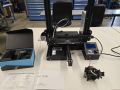
 Starting with a $170 Ender3v1 printer. (I've seen as low as $50 on craigslist). I chose this printer due to its extruded aluminum profile.
 -
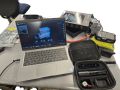 A friend let us borrow their 3D scanner, so I had a slight detour.
 -
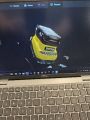 You could read the text on the bottom of it too!
 -
 Replacing the Bowden Extruder with a Direct Drive Sprite Pro. Direct drive allows me to print flexible filament, and the extruder gets to 300C for higher temp filaments.
 -
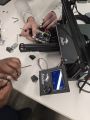 Replacing the stock Ender 3 board with the BIGTREETECH SKR Mini E3 V3.0 was one of the most impactful improvements to the printer. The stock Creality board is limited by its 8-bit processor, loud stepper drivers, and minimal firmware flexibility. The SKR Mini upgrade addressed all of these issues while maintaining compatibility with the Ender 3’s wiring and form factor.
 -
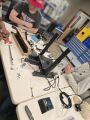 Here we are adding linear rails
 -
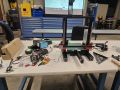 Upgrading Linear Rails
 -
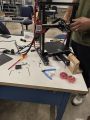 Added supports for wobble
 -
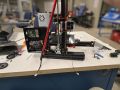 Printed a failed case. I didn't check the usb clearance and trusted google.
 -
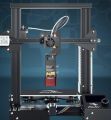 Are those sharks with laser beams attached to their heads?
 -
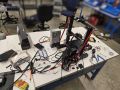 At this point it was a wise move to get a m3,m4,m5 t-nut, kit and screw kit. Enders use these 3 types and nothing more typically. I will say there were a few times i needed a longer bolt that wasn't included in the kit. Buy 8 spares at an extended length and break them to length with your wire strippers.
 -
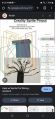 Its always good to have a pinout. There were some spares here that had me worried.
 -
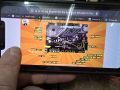 The fans were odd. It came for a direct wire on the fan which I recrimped and moved to the board.
 -
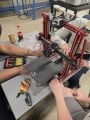 Added some covers to keep the junk out of the t slots.... and it looks cool.
 -
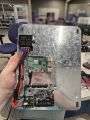 Got a large enclosure. Its nice now but it will be packed in the future.
 -
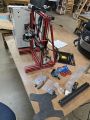 Adding Y axis rail. It was pretty annoying to find the right kit here.


